You are here: My Find IT Easy Account > Software Downloads > Download Release Version > View System Requirements
View System Requirements
All editions of Find IT Easy programs require a Microsoft Windows operating system that can run .net 4.5 or newer. For detailed technical specifications, see https://msdn.microsoft.com/en-CA/library/8z6watww . For individual edition requirements, see below.
On the Website:
- Log in to your Find IT Easy Member Account.
-
Click to select the Software Downloads tab. A list of product releases and optional connectors will appear.
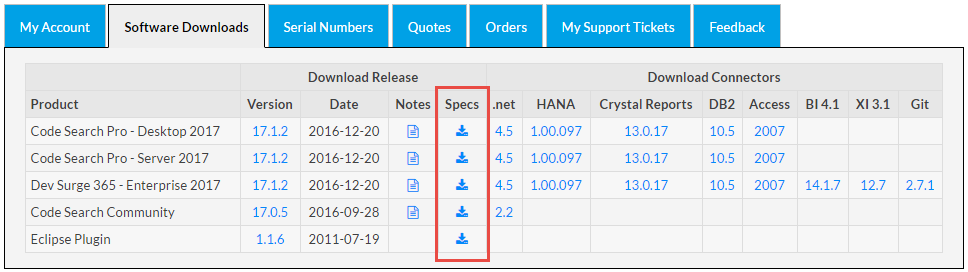
- Locate the product release for which you want to view system requirements.
-
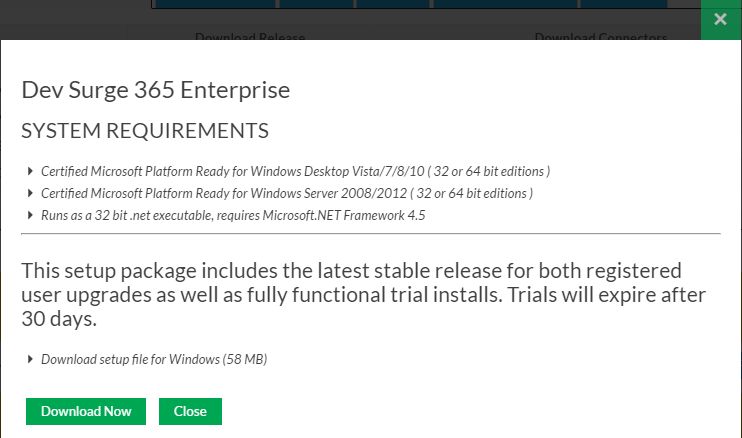
In the Specs column, click on the corresponding download icon. A System Requirements dialog box will appear.
-
To download the selected product release, click on the button.
-
To close the System Requirements dialog box, click on the button.